 GroupAITools
How to use ChatGPT Plus in 2026: the features worth paying for, step by step
Many people upgrade to ChatGPT Plus and keep using it exactly like the free version: one long chat, short questions, copy and paste. That wastes most of what Plus adds. This guide shows how to use ChatGPT Plus properly: choosing the right model, organising work in Projects, building custom GPTs, running deep research, creating images, setting up scheduled tasks and using Codex, with practical workflows for students, freelancers and small businesses in India. If you do not have Plus yet, our shared ChatGPT Plus is ₹399/month.
We sell shared ChatGPT Plus access, so read this as vendor content. Plan details are from chatgpt.com/pricing, viewed from India on 25 Oct 2026. For prices, see our ChatGPT Plus price in India guide and is ChatGPT Plus worth it?
Short answer: to use ChatGPT Plus well, pick the advanced reasoning model for hard problems, keep each client or subject in its own Project, save repeat instructions as a custom GPT, use deep research for sourced reports, and let scheduled tasks handle reminders and recurring summaries. OpenAI lists Plus at ₹1,999 a month in India, above Go at ₹399. ChatGPT Plus on GroupAI Tools is ₹399/month, paid monthly by UPI.
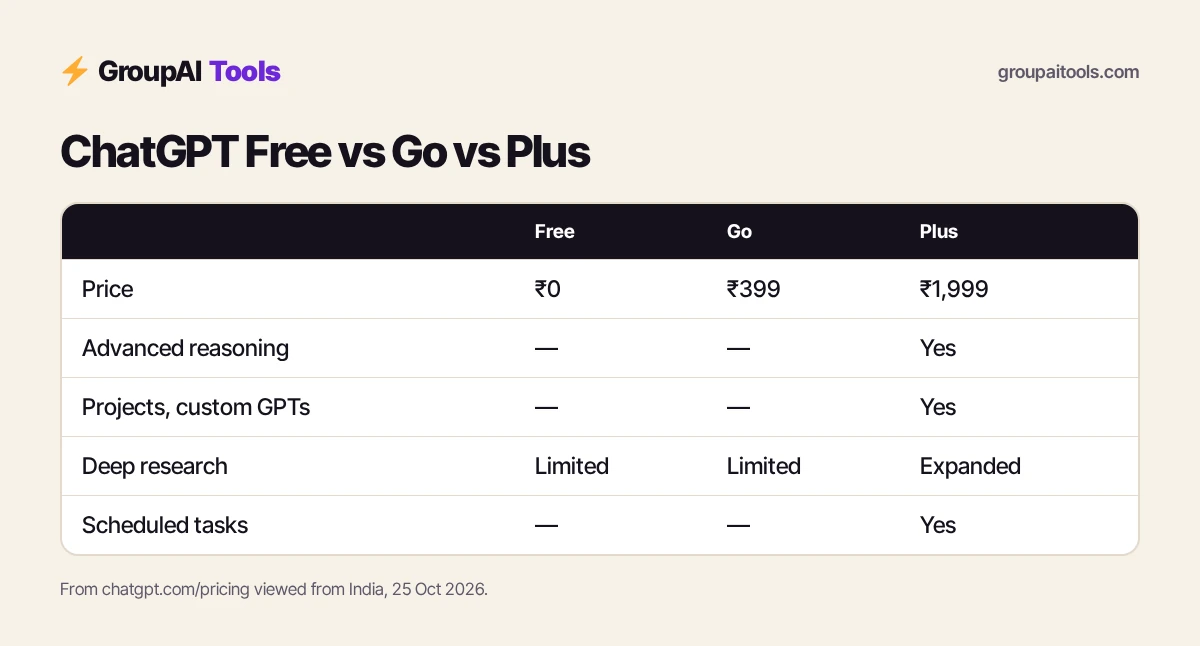
What ChatGPT Plus gives you over Free and Go
| Feature | Free | Go (₹399) | Plus (₹1,999) |
|---|---|---|---|
| Everyday text chats | Unlimited* | Unlimited* | Unlimited* |
| Advanced reasoning with GPT-6 | — | — | Yes |
| Uploads and image creation | Limited | More | Expanded, more accurate images |
| Deep research | Limited | Limited | Expanded |
| Memory and context | Limited | Longer | Expanded |
| Projects, scheduled tasks, custom GPTs | — | — | Included |
| Codex and ChatGPT Work | Limited | Limited | Expanded |
| Ads | — | May include ads | — |
*OpenAI says unlimited chats are subject to abuse guardrails. Go includes everything in Free plus more messages, uploads, images, voice and memory. Pro, from ₹10,699 a month, adds the highest limits.
How to use ChatGPT Plus, step 1: pick the right model
Plus gives you a model picker. Use the fast default for everyday writing, quick questions and brainstorming, and switch to the advanced reasoning model when the task needs careful thinking: maths and data, multi-step plans, code, contracts or comparing options. Reasoning takes longer but makes fewer mistakes on hard problems. A simple rule when you learn how to use ChatGPT Plus: if you would want a human to think for five minutes, choose reasoning.
Step 2: Write prompts that get usable answers
Good prompts give context, a task and a format. Tell ChatGPT who it is helping, what you need, and what the output should look like.
| Weak prompt | Better prompt |
|---|---|
| Write a LinkedIn post about AI | Write a 150-word LinkedIn post for Indian HR managers on using AI to shortlist CVs fairly. Friendly, practical tone, one example, end with a question. |
| Explain GST | Explain GST input tax credit to a first-year B.Com student with one worked example in rupees and a five-question quiz at the end. |
| Make my email better | Rewrite this email to a client who is 30 days late on payment: polite, firm, under 120 words, with a clear due date. |
Ask follow-up questions in the same chat to refine, rather than starting over.
Step 3: Organise work in Projects
Projects group chats, files and instructions in one place. Create one Project per client, course or ongoing piece of work, upload reference files once, and add project instructions such as tone, audience and format. Every new chat in that Project starts with that context. This is the single biggest change in how to use ChatGPT Plus compared with Free.
- Create a Project and name it (for example “Client – Sharma Interiors”).
- Upload brand guidelines, past work and product lists.
- Add instructions: “Write in Indian English, warm tone, prices in rupees.”
- Start each new task as a chat inside the Project.

Step 4: Build a custom GPT for repeat tasks
If you paste the same instructions again and again, turn them into a custom GPT. Describe its job, add knowledge files and choose which tools it can use. Useful examples: a proposal writer that follows your template, a study tutor for a specific syllabus, or a product-description writer for your store. Plus lets you create and use custom GPTs; keep anything confidential out of GPTs on a shared account.
Step 5: Run deep research
Deep research browses many sources and writes a structured report with citations. Use it for market scans, competitor research, literature reviews and buying decisions. Give it a clear scope (“Indian ed-tech market 2024–2026, key players, funding, pricing models”) and the output you want. Reports take several minutes. Always open the sources for figures you plan to quote, because AI can misread or mix up numbers.
Step 6: Create and edit images
Plus offers more and more accurate image creation than Free. Describe the image, style and aspect ratio, then ask for changes in plain language (“make the background white”, “add a diya on the left”). It is handy for blog headers, social posts, simple product mock-ups and slides. For a deeper image workflow, see our is Midjourney worth it? guide.
Step 7: Set up scheduled tasks
Scheduled tasks let ChatGPT do something at a set time, such as a morning news summary on your industry, a weekly reminder to review goals, or a daily vocabulary quiz. Ask in plain language: “Every weekday at 8 AM, give me five top Indian startup news items with links.” Review and pause tasks from settings when you no longer need them.
Step 8: Use memory and files wisely
Plus has expanded memory and context. You can ask ChatGPT to remember preferences (your role, writing style, city) and to forget them later. Upload PDFs, spreadsheets and images for analysis: summarise a report, clean a sales sheet, or extract key dates from a contract. On a shared account, avoid uploading confidential documents or personal data.
Step 9: Try Codex and ChatGPT Work
Plus includes expanded Codex usage for coding tasks and expanded access to ChatGPT Work on desktop, web and mobile for longer, multi-step jobs. Developers can ask Codex to explain a codebase, write tests or fix a bug; non-developers can use ChatGPT Work for research-heavy or multi-file tasks. Start with small, well-defined tasks and check results carefully.
How to use ChatGPT Plus for students
- Create a Project per subject and upload your syllabus and notes.
- Ask for explanations at your level, then a quiz to check understanding.
- Use deep research for project background, then verify every source.
- Use voice to practise interviews or spoken English.
Follow your college’s rules on AI use; use ChatGPT to learn, not to submit its work as your own.
How to use ChatGPT Plus for freelancers and agencies
- One Project per client with brand files and tone instructions.
- A custom GPT for proposals and quotes in your format.
- Image creation for quick social visuals and concepts.
- Deep research for pitch preparation.
Keep client-confidential material off shared accounts.
How to use ChatGPT Plus for small businesses
- Draft WhatsApp broadcasts, Google Business posts and festival offers.
- Turn a product list into descriptions for your website or marketplace.
- Analyse a sales spreadsheet for best sellers and slow movers.
- Write polite payment reminders and customer replies in the language your customers use.
A day using ChatGPT Plus well
9:00 AM
A scheduled task delivers your industry news summary.
11:00 AM
In the client Project, draft a proposal with your custom GPT.
2:00 PM
Run deep research on a competitor and save the report.
4:00 PM
Upload a sales sheet and ask the reasoning model for trends.
6:00 PM
Create two images for tomorrow’s social posts.
Tips: how to use ChatGPT Plus faster
- Add custom instructions in settings so every chat knows your role and style.
- Use Projects instead of one endless chat.
- Ask for tables, checklists or step lists when you need to act on an answer.
- Say “ask me questions first” for complex tasks.
- Check facts, figures and legal or medical answers with primary sources.
Comparing assistants? See ChatGPT Plus vs Claude Pro and Perplexity vs ChatGPT.
Common mistakes
- Using the fast model for problems that need reasoning.
- Keeping every task in one chat so context gets muddled.
- Pasting the same instructions daily instead of building a custom GPT.
- Trusting citations and numbers without checking.
- Uploading confidential files to a shared account.
ChatGPT Plus on GroupAI Tools
| Factor | ChatGPT Plus (OpenAI) | ChatGPT Plus on GroupAI Tools |
|---|---|---|
| Price | ₹1,999 a month | ₹399/month |
| Payment | Card or supported local methods | UPI, RuPay, cards, net banking |
| Commitment | Monthly, renews automatically | Monthly, stop anytime |
| Memory, Projects and files | Private to your account | Shared account; keep confidential files out |
| Support | OpenAI help centre | WhatsApp 9:00 AM–11:30 PM IST, 48-hour refund guarantee |
Our plan gives Plus features month by month in rupees by UPI, with no international card. Read is group buy safe? for how sessions work.
How we checked
We read chatgpt.com/pricing from India on 25 Oct 2026 for plan prices and features. Model names, limits and menu locations change often, so check OpenAI’s help centre if something looks different.
Get started on GroupAI Tools
Here is how buying works on GroupAI Tools. You pick ChatGPT Plus or another tool on its page, pay in rupees with UPI (GPay, PhonePe, Paytm, BHIM), RuPay, cards or net banking, and the tool appears in your dashboard. You open it from Dashboard Login at app.groupaitools.org in a private, isolated browser session, so you never type or see a shared password.
Software that is sold as a licence rather than a web app is delivered as a licence key or an activation by email or WhatsApp instead. WhatsApp support runs from 9:00 AM to 11:30 PM IST, and every tool page shows the 48-hour refund guarantee.
Browse more AI tools on our AI writing and chat tools hub.
FAQs
How do I use ChatGPT Plus effectively?
Choose the reasoning model for hard tasks, organise work in Projects, build custom GPTs for repeat jobs, and use deep research and scheduled tasks.
What can ChatGPT Plus do that Free cannot?
Advanced reasoning with GPT-6, Projects, scheduled tasks, custom GPTs, expanded deep research, images, memory and Codex.
How much is ChatGPT Plus in India?
OpenAI lists Plus at ₹1,999 a month on its India pricing page; Go is ₹399.
How do I use Projects in ChatGPT Plus?
Create a Project, upload reference files, add instructions, and start related chats inside it.
Can I create custom GPTs with ChatGPT Plus?
Yes. Plus lets you create and use custom GPTs with your own instructions and files.
How do I use deep research?
Choose deep research, give a clear scope and output format, wait a few minutes, then verify the sources.
Is ChatGPT Plus good for students?
Yes for explanations, quizzes and research help, as long as you follow your institution’s AI rules.
What does shared ChatGPT Plus cost?
₹399/month on GroupAI Tools, paid monthly.