 GroupAITools
How to use ElevenLabs in 2026: realistic AI voiceovers, step by step
ElevenLabs is the AI voice tool many YouTubers, course creators and agencies use for natural-sounding voiceovers, narration, dubbing and sound effects. The quality is impressive out of the box, but getting voiceovers that sound human, not robotic, takes a few habits. This guide shows how to use ElevenLabs step by step: generating speech, picking and tuning voices, cloning a voice, building long-form audio in Studio, dubbing videos, and keeping an eye on credits, with workflows for Indian creators. If you do not have a plan, our shared ElevenLabs is ₹299/month.
We sell shared ElevenLabs access, so read this as vendor content. Plan details are from elevenlabs.io/pricing, checked on 25 Oct 2026. For full prices, see our ElevenLabs price in India guide.
Short answer: to use ElevenLabs, paste your script into Text to Speech, choose a voice from the library, adjust stability and style, and generate. Use Studio for long scripts such as audiobooks and courses, voice cloning for your own voice (Starter and up), and Dubbing to translate videos. Everything uses credits: Free has 10,000 a month, Starter $6 has 30,000 and Creator $22 has 121,000. Shared ElevenLabs on GroupAI Tools is ₹299/month, paid monthly by UPI.
ElevenLabs plans and credits
| Plan | Price (monthly) | Credits a month | Approx. TTS minutes | Key additions |
|---|---|---|---|---|
| Free | $0 | 10k | ~10 | Text to speech, speech to text, sound effects, music, 3 Studio projects |
| Starter | $6 | 30k | ~30 | Commercial licence, instant voice cloning, 20 Studio projects, Dubbing Studio |
| Creator | $22 | 121k | ~121 | Professional voice cloning, additional credits |
| Pro | $99 | 600k | ~600 | 192 kbps audio, 44.1 kHz PCM via API |
| Scale | $299 | 1.8M | ~1,800 | 3 workspace seats, team collaboration |
| Business | $990 | 6M | ~6,000 | 10 seats, low-latency TTS |
Dollar conversions on this page use ₹94.9 per US dollar, the reference rate on 23 Oct 2026 (the last trading day before this update). Your bank or card network applies its own rate and may add a forex markup of a few per cent, and GST at 18% can apply to foreign digital services bought by Indian customers, so your statement can differ.
ElevenLabs was running first-month discounts on Starter and Creator until 1 November 2026; the regular monthly prices above are what you pay after that. Prices exclude taxes.

How to use ElevenLabs, step 1: generate your first voiceover
- Open Text to Speech.
- Paste a short paragraph of your script.
- Pick a voice from the default list or the voice library.
- Choose the model (ElevenLabs’ newest model is listed first; older ones remain available).
- Click generate, listen, and download as MP3 or another format your plan allows.
Start with a short test paragraph before generating a full script; it saves credits while you find the right voice and settings.
Step 2: Choose the right voice
The voice library has thousands of voices filtered by language, accent, age, gender and use case such as narration, conversational, news or characters. For Indian audiences, filter for Indian English or your target language and test a few voices with the same paragraph. Choose a voice that matches the content: a calm narrator for courses, an energetic one for reels, a warm one for explainers.
Step 3: Tune stability, similarity and style
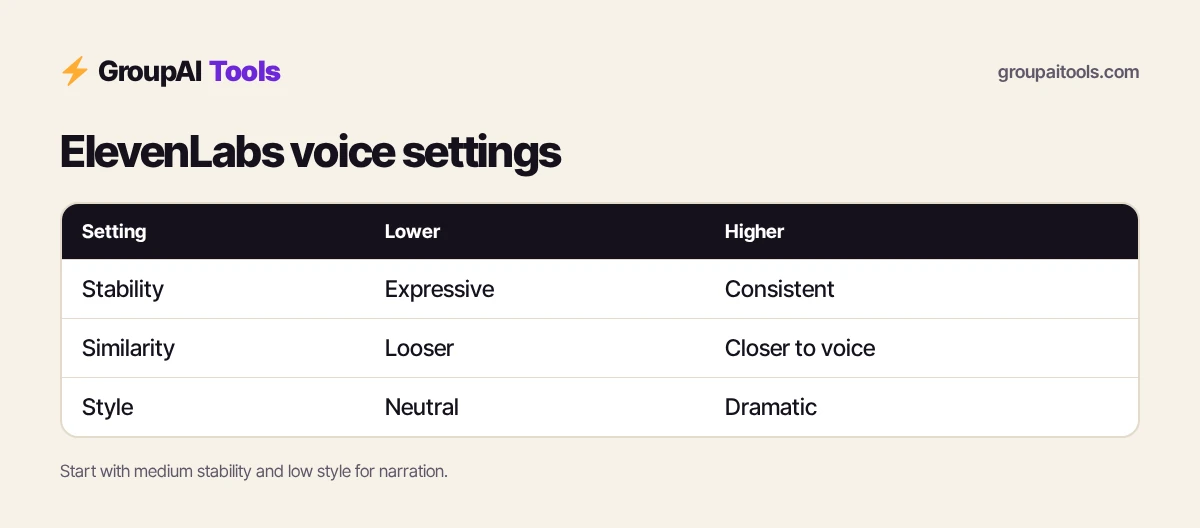
| Setting | Lower | Higher |
|---|---|---|
| Stability | More expressive and varied, can be less consistent | More consistent and even, can sound flat |
| Similarity | Looser to the original voice | Closer to the original voice |
| Style exaggeration | Neutral delivery | More dramatic delivery; uses more processing |
A common starting point for narration is medium stability and low style, then adjust after listening. These controls are a big part of how to use ElevenLabs to sound natural rather than robotic.
Step 4: Write scripts that sound human
- Write the way people speak: short sentences, contractions, simple words.
- Use punctuation for pacing: commas for short pauses, full stops for longer ones, and ellipses or line breaks for breaths.
- Spell out numbers, currencies and abbreviations the way you want them read (“two thousand rupees”, “G S T”).
- Write names phonetically if the voice mispronounces them.
- Split long scripts into paragraphs and regenerate only the parts that sound off.
Step 5: Clone your own voice
Instant voice cloning, from Starter upwards, creates a usable copy of a voice from a short clean recording. Professional voice cloning, from Creator, trains on more audio for a much closer match. Record in a quiet room with a decent microphone, speak naturally and avoid background music. Only clone your own voice or one you have clear written permission to use; ElevenLabs requires consent, and misusing someone’s voice can break the law. Do not clone your voice on a shared account, because voice clones live in the account.
Step 6: Build long audio in Studio
Studio is designed for long-form projects such as audiobooks, podcasts, course modules and long YouTube scripts. Import a document, assign voices to chapters or speakers, adjust pronunciation and pacing paragraph by paragraph, and export the finished audio. Free includes 3 Studio projects and Starter 20. Learning how to use ElevenLabs Studio is worthwhile once your scripts run past a few minutes.
Step 7: Dub and translate videos
Dubbing translates the speech in a video into another language while keeping the speaker’s voice characteristics. Starter and higher plans include Dubbing Studio, where you can edit the translated transcript and timing before export. Use it to turn an English tutorial into Hindi, Tamil or Spanish versions, then have a native speaker check the translation for anything your audience might find odd.
Step 8: Sound effects, music and speech to text
- Sound effects: describe a sound (“crowd cheering in a cricket stadium”) and generate it for videos and podcasts.
- Music: generate short background tracks; commercial use of music needs a paid plan.
- Speech to text: transcribe interviews, meetings or videos into text for captions and notes.
- Voice isolator: clean background noise from your own recordings.
Step 9: Keep track of credits
Every generation uses credits, and longer or higher-quality outputs use more. Check your remaining credits in your account before big jobs, regenerate only the paragraphs that need it, and test settings on short clips first. ElevenLabs explains how credits reset and roll over in its pricing FAQ.
How to use ElevenLabs for YouTube and reels
- Write a script of about 150 words for each minute of video.
- Test three voices on the first paragraph.
- Generate the full voiceover in paragraphs.
- Add the audio to your editor and cut the visuals to the voice.
- Generate a sound effect or two for transitions.
For faceless channels with an on-screen presenter, pair ElevenLabs with an avatar tool; see our HeyGen price in India guide.
How to use ElevenLabs for courses and e-learning
Many creators draft and tighten scripts with ChatGPT Plus (₹399/month) before voicing them. Import each module script into Studio, assign one consistent narrator voice, set pronunciations for technical terms once, and export module by module. Consistent voice across modules makes a course feel professional, and fixing a single sentence is far quicker than re-recording yourself.
How to use ElevenLabs for businesses
- IVR and phone-menu prompts in English and regional languages.
- Product explainer voiceovers for websites and ads.
- Internal training audio and announcements.
- Multilingual versions of marketing videos through Dubbing.
Commercial use requires a paid plan with a commercial licence (Starter and above).
Tips: how to use ElevenLabs faster
- Save favourite voices to your library.
- Keep a pronunciation list for brand and place names.
- Generate in paragraphs so retakes are cheap.
- Export at the quality your platform needs; higher bitrates are on Pro and above.
- Add light background music to hide minor transitions between paragraphs.
Common mistakes
- Pasting a whole script before testing voice and settings.
- Writing in formal, written English that sounds stiff when spoken.
- Cloning a voice without consent.
- Using Free-plan audio commercially.
- Burning credits by regenerating whole scripts for one bad sentence.
ElevenLabs on GroupAI Tools
| Factor | ElevenLabs plan | Shared ElevenLabs on GroupAI Tools |
|---|---|---|
| Price | $6–$990 a month, plus taxes and forex | ₹299/month |
| Payment | International card | UPI, RuPay, cards, net banking |
| Commitment | Monthly or yearly | Monthly, stop anytime |
| Voice clones | Private to your account | Shared account; do not clone your voice here |
| Support | ElevenLabs support | WhatsApp 9:00 AM–11:30 PM IST, 48-hour refund guarantee |
Our plan gives you ElevenLabs month by month in rupees by UPI, with no international card or forex charges. Read is group buy safe? for how sessions work.
How we checked
We read elevenlabs.io/pricing on 25 Oct 2026 for plans, credits, minutes and features. Interface names change as ElevenLabs updates its app; check its help centre if something looks different.
Get started on GroupAI Tools
Here is how buying works on GroupAI Tools. You pick ElevenLabs or another tool on its page, pay in rupees with UPI (GPay, PhonePe, Paytm, BHIM), RuPay, cards or net banking, and the tool appears in your dashboard. You open it from Dashboard Login at app.groupaitools.org in a private, isolated browser session, so you never type or see a shared password.
Software that is sold as a licence rather than a web app is delivered as a licence key or an activation by email or WhatsApp instead. WhatsApp support runs from 9:00 AM to 11:30 PM IST, and every tool page shows the 48-hour refund guarantee.
Browse more video and audio tools on our video and audio tools hub.
FAQs
How do I use ElevenLabs for the first time?
Open Text to Speech, paste a short paragraph, pick a voice, adjust settings and generate; then scale up to the full script.
Is ElevenLabs free to use?
Yes, the Free plan gives 10,000 credits a month (about 10 minutes of speech) without a commercial licence.
How do I make ElevenLabs sound natural?
Write conversational scripts, use punctuation for pacing, and tune stability and style.
Can I clone my voice on ElevenLabs?
Yes. Instant cloning is on Starter and up; professional cloning is on Creator and up. Only clone voices you have consent to use.
Does ElevenLabs support Indian languages?
ElevenLabs lists support for many languages; test your target language with a few voices before a big project.
What is ElevenLabs Studio?
A long-form editor for audiobooks, courses and podcasts, with chapter-level voice and pronunciation control.
Can I use ElevenLabs audio on YouTube?
Commercial use needs a paid plan with a commercial licence, from Starter upwards.
What does shared ElevenLabs cost?
₹299/month on GroupAI Tools, paid monthly.