 GroupAITools
How to use HeyGen in 2026: make AI avatar videos step by step

HeyGen turns a script into a video with a realistic AI presenter, and can translate existing videos into other languages with lip-sync. It is popular with YouTubers who prefer not to appear on camera, course creators, marketers and HR teams. This guide shows how to use HeyGen step by step: choosing or creating an avatar, writing a script that sounds natural, building scenes in the AI Studio editor, using Video Agent, translating videos, and exporting, with workflows for Indian creators and businesses. If you do not have a plan, our shared HeyGen is ₹299/month.
We sell shared HeyGen access, so read this as vendor content. Plan details are from heygen.com/pricing, viewed from India on 25 Oct 2026. For full prices, see our HeyGen price in India guide and HeyGen vs Synthesia.
Short answer: to use HeyGen, pick a stock avatar or create your own, paste a script, choose a voice and language, add scenes, backgrounds and media in the AI Studio editor, then export. Use Video Agent to draft a whole video from a prompt, and video translation to localise videos. Free gives 3 watermarked videos a month up to 1 minute; Creator is $29 a month and Pro $49, with two months free on yearly billing. Shared HeyGen on GroupAI Tools is ₹299/month, paid monthly by UPI.
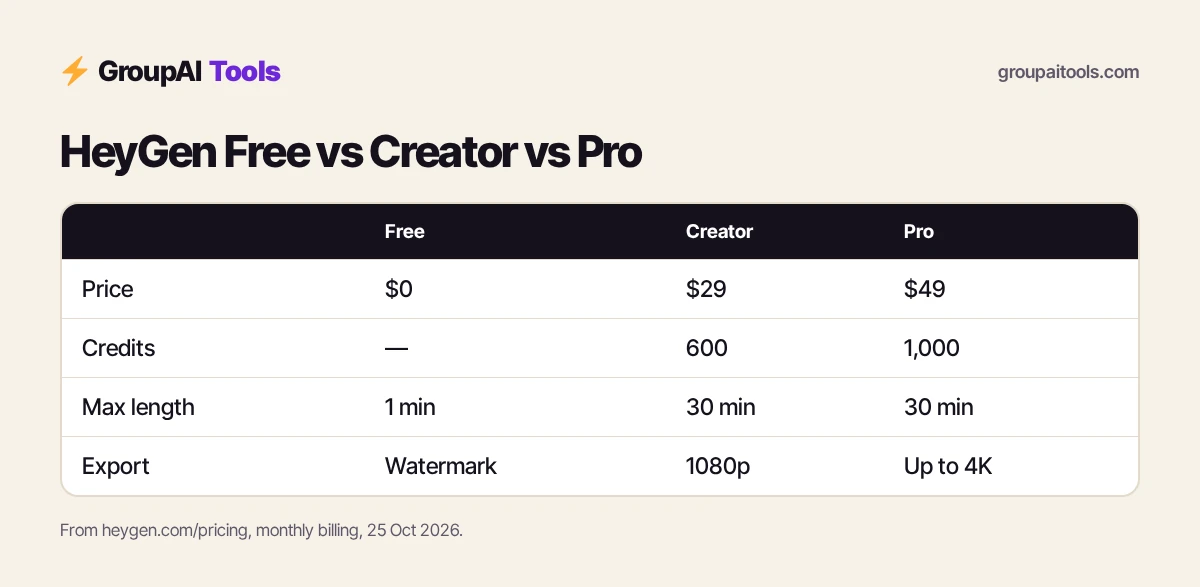
HeyGen plans for individuals
| Free | Creator | Pro | |
|---|---|---|---|
| Price (monthly) | $0 | $29 | $49 |
| Credits | — | 600 | 1,000 |
| Videos | 3 a month, watermarked | Watermark removed | Watermark removed |
| Max video length | 1 minute | 30 minutes | 30 minutes |
| Export | Watermarked | 1080p | Up to 4K |
| Languages | 30+ | 175+ languages and dialects | 175+ |
| Extras | Avatar IV, Video Agent, 1 custom avatar | Custom avatar with your voice, credits roll over a month | Cinematic Avatars, Seedance 2.5, VEO 3.1, faster processing, edit translated scripts |
Dollar conversions on this page use ₹94.9 per US dollar, the reference rate on 23 Oct 2026 (the last trading day before this update). Your bank or card network applies its own rate and may add a forex markup of a few per cent, and GST at 18% can apply to foreign digital services bought by Indian customers, so your statement can differ.
HeyGen offers two months free on yearly billing and separate business plans for teams.
How to use HeyGen, step 1: choose an avatar
HeyGen offers 500+ ready-made presenters on Free and 700+ on paid plans, in different ages, styles and settings. Choose one that fits your audience and topic: formal for corporate training, casual for social media, a friendly teacher for courses. Photo avatars let you animate a still image. Test two or three avatars with the same short script before committing to one for a series.
Step 2: Create your own avatar (optional)
All plans allow at least one custom video avatar, and paid plans let it use your own voice and likeness. Record the footage HeyGen asks for in good light, against a plain background, looking at the camera and speaking naturally. Only create avatars of yourself or people who have given clear consent. Because custom avatars stay in the account where they are made, do not create your personal avatar on a shared account.
Step 3: Write a script that sounds natural
- Aim for about 130–150 words per minute of video.
- Write as you would speak: short sentences, simple words.
- Break the script into scenes, one idea each.
- Spell out numbers and abbreviations the way you want them read.
- Read it aloud once; anything awkward to say will sound awkward from an avatar.
Many creators draft scripts with ChatGPT Plus (₹399/month) and then edit for their voice.
Step 4: Build the video in AI Studio
- Create a new video and choose a template or blank canvas.
- Pick your avatar and voice for each scene.
- Paste each scene’s script.
- Add backgrounds, text, logos, images and B-roll.
- Preview, adjust pauses and timing, then generate.
You can import PowerPoint or PDF files to turn existing slides into a presented video, which is one of the quickest ways to use HeyGen for training content.

Step 5: Draft faster with Video Agent
Video Agent creates a draft video from a prompt or brief: you describe the topic, audience and length, and it writes a script, picks visuals and assembles scenes. Free has access; Creator gets expanded access and Pro maximum access. If you are still learning how to use HeyGen, Video Agent is a good way to see how a finished video is structured. Treat the result as a first draft and edit the script and visuals before publishing.
Step 6: Translate videos into other languages
Video translation takes a video, including one recorded on camera, and produces versions in other languages with the speaker’s voice and lip movements matched. Paid plans support 175+ languages and dialects; Pro lets you edit and proofread the translated script. This is how many Indian creators turn one English video into Hindi, Tamil, Telugu or Bengali versions. Have a native speaker review important videos before release. For regional reach, this is often the most valuable way to use HeyGen.
Step 7: Export and publish
Free videos carry a HeyGen watermark; Creator removes branding and exports in 1080p; Pro exports in up to 4K. Videos can be up to 1 minute on Free and up to 30 minutes on paid plans. Download MP4s for YouTube, Instagram and LinkedIn, or embed for websites and learning platforms. Check aspect ratio before you start: 16:9 for YouTube, 9:16 for reels and shorts.
Step 8: Understand credits
Paid plans include monthly credits (600 on Creator, 1,000 on Pro) that are used by video generation and AI features; Creator credits roll over for one month, and Pro can top up with rollover. Heavier features such as advanced avatars and generative video use more. Before a big project, check how many credits it will use, and keep test renders short.
How to use HeyGen for YouTube and faceless channels
- Pick one avatar and voice for the channel and stick with it for consistency.
- Write scripts in scenes and add B-roll to every scene so the avatar is not on screen the whole time.
- Create shorts by trimming key moments to 9:16.
- Translate your best videos to reach regional audiences.
Check YouTube’s policies on AI-generated content and disclose synthetic media where required.
How to use HeyGen for courses and corporate training
Turn slide decks into presented lessons by importing PowerPoint or PDF, adding an instructor avatar and voice, and generating module by module. Updating a lesson means editing the script, not re-shooting. HR and L&D teams use HeyGen for onboarding, compliance and product training in several languages.
How to use HeyGen for marketing
- Personalised sales videos for prospects.
- Product explainers for websites and landing pages.
- Ad variations in different languages and with different hooks.
- Festival greetings and offer announcements with a brand presenter.
How to use HeyGen for your first video in 30 minutes
5 minutes
Write a 150-word script in three scenes.
5 minutes
Pick an avatar and voice; test one scene.
10 minutes
Add backgrounds, logo, text and one B-roll clip per scene.
10 minutes
Generate, review, fix pauses or pronunciation, and export.
Tips: how to use HeyGen faster
- Save brand templates with your logo, colours and fonts.
- Reuse the same avatar and voice across a series.
- Keep scenes under 20 seconds and cut to B-roll often.
- Fix mispronunciations by spelling words phonetically.
- Preview a short section before generating long videos.
Need only a voiceover? See our ElevenLabs price in India guide.
Common mistakes
- Long talking-head scenes with no visuals.
- Scripts written for reading, not speaking.
- Creating a personal avatar on a shared account.
- Publishing translations without a native-speaker check.
- Starting a long video before checking credits.
HeyGen on GroupAI Tools
| Factor | HeyGen plan | Shared HeyGen on GroupAI Tools |
|---|---|---|
| Price | $29–$49 a month for individuals, plus taxes and forex | ₹299/month |
| Payment | International card | UPI, RuPay, cards, net banking |
| Commitment | Monthly or yearly | Monthly, stop anytime |
| Custom avatars | Private to your account | Shared account; do not create a personal avatar here |
| Support | HeyGen support | WhatsApp 9:00 AM–11:30 PM IST, 48-hour refund guarantee |
Our plan lets you use HeyGen month by month in rupees by UPI, without an international card or forex charges. Read is group buy safe? for how sessions work.
How we checked
We read heygen.com/pricing from India on 25 Oct 2026 for plans, credits, video limits and features. HeyGen updates its editor and models often; check its help centre if something looks different.
Get started on GroupAI Tools
Here is how buying works on GroupAI Tools. You pick HeyGen or another tool on its page, pay in rupees with UPI (GPay, PhonePe, Paytm, BHIM), RuPay, cards or net banking, and the tool appears in your dashboard. You open it from Dashboard Login at app.groupaitools.org in a private, isolated browser session, so you never type or see a shared password.
Software that is sold as a licence rather than a web app is delivered as a licence key or an activation by email or WhatsApp instead. WhatsApp support runs from 9:00 AM to 11:30 PM IST, and every tool page shows the 48-hour refund guarantee.
Browse more video and audio tools on our video and audio tools hub.
FAQs
How do I use HeyGen for the first time?
Pick an avatar, paste a short script, choose a voice, add a background and generate a test video, then build longer videos scene by scene.
Is HeyGen free to use?
Yes, Free gives 3 watermarked videos a month of up to 1 minute each.
How much does HeyGen cost?
Creator is $29 a month and Pro $49 a month, with two months free on yearly billing.
Can HeyGen make videos in Hindi?
HeyGen supports 175+ languages and dialects on paid plans; test your target language and have a native speaker review.
Can I create an avatar of myself in HeyGen?
Yes. All plans include at least one custom video avatar; only create avatars with consent and in your own account.
What is HeyGen Video Agent?
A feature that drafts a full video from a prompt, including script, visuals and scenes.
How long can HeyGen videos be?
Up to 1 minute on Free and up to 30 minutes on Creator and Pro.
What does shared HeyGen cost?
₹299/month on GroupAI Tools, paid monthly.