 GroupAITools
How to use Midjourney in 2026: from your first prompt to client-ready images
Midjourney makes some of the most striking AI images available, but new users often get muddy results because they type a short phrase and hope for the best. This guide shows how to use Midjourney properly: where to create, how to write a prompt that works, the handful of parameters that matter, how to upscale and vary images, when to use Relax mode, and step-by-step workflows for social posts, thumbnails and client mood boards. If you do not have a plan yet, our shared Midjourney is ₹499/month.
We sell shared Midjourney access, so read this as vendor content. Plan details are from Midjourney’s plan comparison and feature notes from Midjourney’s documentation, checked on 25 Oct 2026. For prices, see our Midjourney price in India guide and is Midjourney worth it?
Short answer: to use Midjourney, sign in at midjourney.com, type a prompt in the create bar describing subject, setting, style, lighting and mood, then add parameters such as --ar for aspect ratio and --s for stylisation. Pick the best of the four results, then upscale, vary or edit it. Use Relax mode (Standard plan and above) for exploration and save fast hours for finals. Plans start at $10 a month; shared Midjourney on GroupAI Tools is ₹499/month, paid monthly by UPI.
Before you start: where you use Midjourney
Midjourney works in two places: the web app at midjourney.com and its Discord server. Most new users find the web app easier, because prompts, results, likes and folders sit in one gallery and settings are point-and-click. Discord still works if you prefer it, using the /imagine command. Everything in this guide applies to both, though menu names differ slightly.
There is no free plan, so you need an active subscription to create. Plans are Basic ($10), Standard ($30), Pro ($60) and Mega ($120) a month, with 20% off yearly billing. Learning how to use Midjourney well on a small plan matters, because fast GPU time is the limit you will hit first.
How to use Midjourney, step 1: write your first prompt
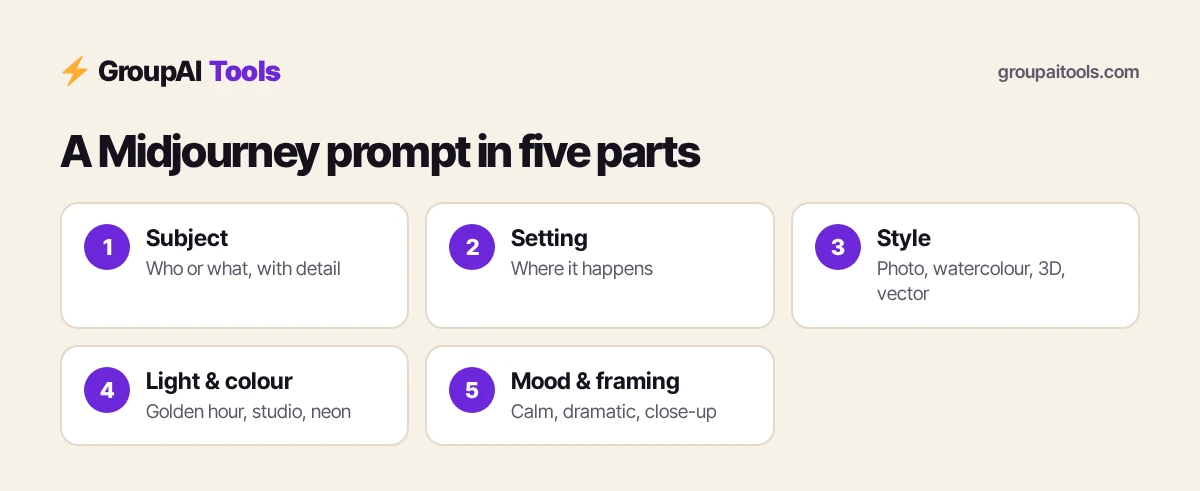
Type a description of the image you want in the create bar and press Enter. Midjourney returns four variations in under a minute on fast mode. A useful prompt answers five questions:
- Subject: who or what is in the image, with detail (an elderly chai seller, a matte black water bottle).
- Setting: where it is (a busy Kolkata street at dawn, a marble kitchen counter).
- Style or medium: photograph, watercolour, 3D render, flat vector illustration.
- Lighting and colour: golden hour, soft studio light, neon, muted pastels.
- Mood and framing: calm, dramatic, close-up, wide shot, top-down.
Example: an elderly chai seller pouring tea from height, busy Kolkata street at dawn, documentary photograph, warm golden light, shallow depth of field, close-up. Specific nouns beat long lists of adjectives; words like “beautiful” or “8K” add little.
Step 2: Learn the parameters that matter
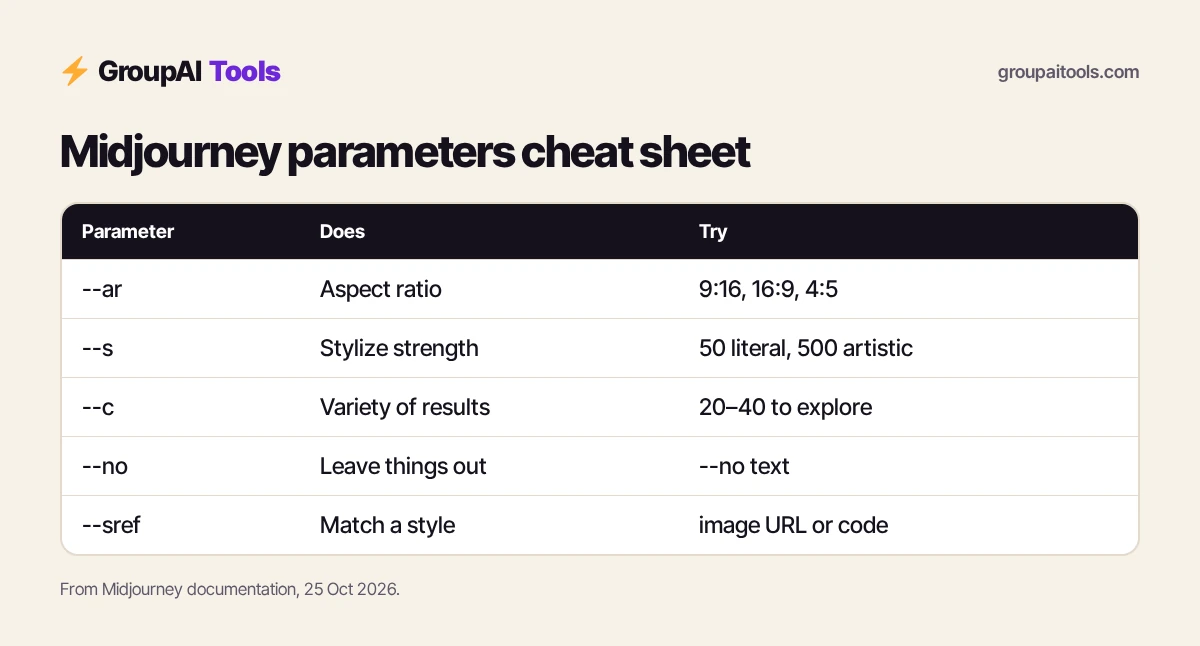
Parameters go at the end of a prompt, each starting with two hyphens. You do not need dozens of them to use Midjourney well; these cover most work:
| Parameter | What it does | Example |
|---|---|---|
| --ar | Aspect ratio | --ar 9:16 for reels and stories, --ar 16:9 for thumbnails, --ar 4:5 for Instagram feed |
| --s (stylize) | How strongly Midjourney applies its own aesthetic | --s 50 for literal, --s 500 for artistic |
| --c (chaos) | How different the four results are from each other | --c 30 to explore ideas |
| --no | Things to leave out | --no text, watermark |
| --sref | Match the style of a reference image or style code | --sref plus an image URL |
| --seed | Repeat a starting point for consistent tests | --seed 1234 |
Midjourney adds and retires parameters as models change, so check Midjourney’s documentation for the current list and the default model version in your settings.
Step 3: Upscale, vary and edit the best result
Each prompt gives a grid of four images. Open the one you like and you will see options to:
- Upscale it to a larger, more detailed version for download.
- Vary it subtly or strongly to get close alternatives.
- Edit part of the image, for example repainting a region or extending the canvas.
- Use as reference for a new prompt, keeping its look.
A good habit when you learn how to use Midjourney: generate a few rounds in Relax mode until a direction clearly works, then spend fast time on upscales and edits only for the winners.
Step 4: Use image prompts and style references
You can drag your own image into the create bar as a starting point, a style reference or a character or object reference, depending on the options shown. This is the easiest way to keep a consistent look across a campaign: create one image you love, then use it as a style reference for the rest. For brand work, keep a small library of reference images and the prompts that produced them.
Step 5: Personalise Midjourney to your taste
Midjourney offers personalisation: you rate pairs of images and it learns what you prefer, then you can switch your personal style on for new prompts. Moodboards let you collect images that define a look. Both make results feel more like yours and less like generic AI art, which is why serious users set them up early.
Step 6: Make short videos
All Midjourney plans can animate images into short video clips. Open an image and choose the animate option, then let Midjourney decide the motion automatically or describe it yourself. Video uses more GPU time than images; Standard and above offer HD, and Pro and Mega add unlimited SD video in Relax mode. Clips work well as reel openers, product teasers and moving backgrounds.
Step 7: Manage fast hours and Relax mode
| Plan | Fast GPU time a month | Relax mode |
|---|---|---|
| Basic | 3.3 hours (200 minutes) | — |
| Standard | 15 hours | Unlimited images |
| Pro | 30 hours | Unlimited images and SD video |
| Mega | 60 hours | Unlimited images and SD video |
Fast mode gives results in about a minute; Relax mode queues jobs at lower priority but does not use your fast hours. Switch between them in settings. Extra fast time costs $4 an hour. Knowing when to switch is a big part of how to use Midjourney economically.
Step 8: Understand privacy and commercial use
- Images on Basic and Standard can be visible in Midjourney’s public gallery; Stealth Mode, which keeps work private, is only on Pro and Mega.
- Midjourney’s terms allow broad commercial use of what you create; companies with over $1 million in yearly gross revenue must buy Pro or Mega.
- Do not upload confidential client material, unreleased products or personal photos to any shared account.
How to use Midjourney for Instagram and reels
- Decide the format first: --ar 4:5 for feed, --ar 9:16 for stories and reels.
- Write a prompt with your brand colours named in plain words (deep teal and saffron).
- Generate in Relax mode until one image fits; save it as a style reference.
- Create the rest of the week’s visuals using that style reference.
- Animate one hero image into a short clip for a reel.
- Add text and logo in a design tool, because Midjourney’s text in images is not reliable for offers and prices.
For layouts and captions, pair Midjourney with Canva Pro (₹299/month).
How to use Midjourney for YouTube thumbnails
Use --ar 16:9 and describe a single, bold subject with strong contrast and empty space where your title will go, for example “surprised young Indian man holding a smartphone, bright yellow background, empty space on the right, studio lighting”. Generate a few rounds, upscale the best, then add your face cut-out and title text in an editor. Thumbnails are where learning how to use Midjourney pays back fastest for creators.
How to use Midjourney for client mood boards
- Break the brief into three or four directions (minimal, festive, premium, playful).
- Run each direction with --c 20 to 40 for variety.
- Upscale the strongest two per direction.
- Export and arrange them on one board for the client.
- Once a direction is chosen, use it as a style reference for final assets.
Agencies doing client work should note the Stealth Mode rule above and keep confidential briefs off shared accounts.
How to use Midjourney for product and e-commerce visuals
Midjourney is good at lifestyle scenes and backgrounds, less reliable at reproducing an exact product. A practical approach: generate the scene (a marble counter with soft morning light and eucalyptus), then place your real product photo into it in an editor. For festive campaigns such as Diwali, Holi or Eid, describe colours, diyas, rangoli or fabrics in detail rather than writing “Indian festival”.
Prompt examples you can adapt
| Use | Prompt |
|---|---|
| Food blog | top-down photograph of masala dosa with coconut chutney and sambar on a banana leaf, natural window light, rustic wooden table --ar 4:5 |
| Travel post | misty tea plantation in Munnar at sunrise, rolling green hills, cinematic wide shot, soft fog --ar 16:9 |
| Logo exploration | minimal flat vector logo of a lotus combined with a leaf, single colour, white background --no text |
| Book cover | watercolour illustration of a lone lighthouse on a stormy coast, moody blues, lots of negative space at top --ar 2:3 |
| Character | friendly cartoon tiger mascot for a kids’ maths app, bright colours, 3D render, white background |
Change one element at a time when a result is close; rewriting the whole prompt makes it hard to learn what worked.
Tips: how to use Midjourney faster
- Keep a prompt notebook with the prompt, parameters and the result you liked.
- Explore in Relax mode; save fast hours for upscales and edits.
- Use --no to remove recurring problems such as text or extra objects.
- Organise results into folders by client or project.
- Check hands, text and small details at full size before publishing.
Common mistakes
- Writing three words and expecting a polished result.
- Stacking dozens of adjectives instead of specific nouns.
- Burning fast hours on exploration.
- Assuming images are private on Basic or Standard.
- Using Midjourney text for prices, offers or legal lines.
Shared Midjourney on GroupAI Tools
| Factor | Midjourney plan | Shared Midjourney on GroupAI Tools |
|---|---|---|
| Price | $10–$120 a month, plus GST and forex | ₹499/month |
| Payment | International card | UPI, RuPay, cards, net banking |
| Commitment | Monthly or yearly | Monthly, stop anytime |
| Privacy | Stealth Mode on Pro and Mega | Shared account; not for confidential client work |
| Support | Midjourney billing support | WhatsApp 9:00 AM–11:30 PM IST, 48-hour refund guarantee |
Dollar conversions on this page use ₹94.9 per US dollar, the reference rate on 23 Oct 2026 (the last trading day before this update). Your bank or card network applies its own rate and may add a forex markup of a few per cent, and GST at 18% can apply to foreign digital services bought by Indian customers, so your statement can differ.
Our plan lets you practise how to use Midjourney month to month in rupees, without an international card or forex charges. Read is group buy safe? to see how sessions work.
How we checked
We read Midjourney’s plan comparison and Midjourney’s documentation on 25 Oct 2026 for plans, GPU hours, Relax mode, video and privacy rules. Parameters and menu names can change as Midjourney releases new models, so check the documentation if an option looks different.
Get started on GroupAI Tools
Here is how buying works on GroupAI Tools. You pick Midjourney or another tool on its page, pay in rupees with UPI (GPay, PhonePe, Paytm, BHIM), RuPay, cards or net banking, and the tool appears in your dashboard. You open it from Dashboard Login at app.groupaitools.org in a private, isolated browser session, so you never type or see a shared password.
Software that is sold as a licence rather than a web app is delivered as a licence key or an activation by email or WhatsApp instead. WhatsApp support runs from 9:00 AM to 11:30 PM IST, and every tool page shows the 48-hour refund guarantee.
Browse more design tools on our design and image tools hub.
FAQs
How do I use Midjourney for the first time?
Sign in at midjourney.com with an active plan, type a detailed prompt in the create bar, then upscale or vary the best of the four results.
Can I use Midjourney without Discord?
Yes. The web app at midjourney.com lets you create, organise and edit images without Discord.
Is there a free way to use Midjourney?
Midjourney has no free plan. Plans start at $10 a month; shared access is another option.
How do I change the aspect ratio in Midjourney?
Add --ar to the end of your prompt, for example --ar 9:16 for stories or --ar 16:9 for thumbnails.
What is Relax mode in Midjourney?
A lower-priority queue that does not use fast hours. Standard and higher plans get unlimited Relax images.
How do I keep a consistent style in Midjourney?
Use a style reference (--sref) from an image you like, and set up personalisation or a moodboard.
Can Midjourney write text in images?
It can attempt short text, but it is not reliable for prices or offers; add text in a design tool.
What does shared Midjourney cost?
₹499/month on GroupAI Tools, paid monthly.