 GroupAITools
How to use Surfer SEO in 2026: write and optimise content that ranks

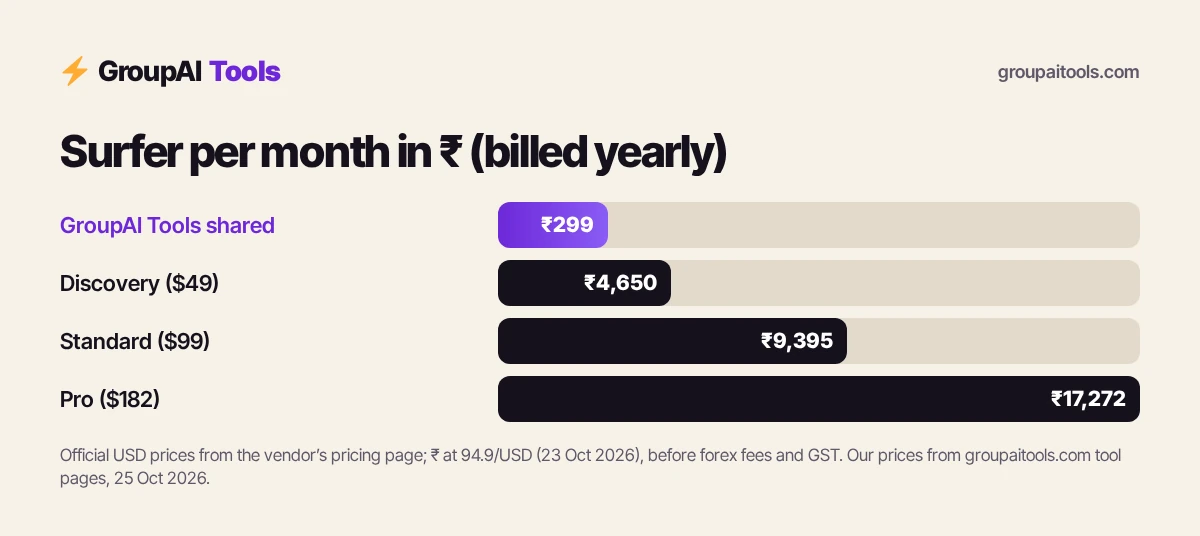
Surfer is an on-page SEO tool built around one idea: compare your content with what already ranks, then tell you what to add, cut or change. In 2026 it also tracks whether AI assistants such as ChatGPT, Perplexity and Google’s AI Overviews mention your brand. This guide shows how to use Surfer SEO step by step: planning topics, writing in the Content Editor, reading the Content Score, using the Surfy assistant, internal linking, auditing old posts and tracking AI visibility, with workflows for Indian bloggers, agencies and in-house teams. Our shared Surfer SEO is ₹299/month.
We sell shared Surfer access, so read this as vendor content. Plan details are from surferseo.com/pricing, checked on 25 Oct 2026. For full prices, see our Surfer SEO price in India guide.
Short answer: to use Surfer SEO, research a topic with Keyword Research or a Topical Map, open a Content Editor document for your target keyword and location, write or paste your draft, and work through the suggested terms, headings, length and structure until the Content Score is competitive. Then add internal links, publish, and use Content Audit to refresh older posts. Plans start at $49 a month billed yearly (Discovery). Shared Surfer on GroupAI Tools is ₹299/month, paid monthly by UPI.
Surfer plans and what each unlocks
| Plan | Billed yearly | Billed monthly | Highlights |
|---|---|---|---|
| Discovery | $49/mo | $59 | 120 documents, track 10 pages, AI SEO guidelines, Surfy and Humanizer |
| Standard | $99/mo | $119 | 360 documents, 25 AI prompts weekly, integrations, 1-click optimisation, plagiarism check, rank drop detection |
| Pro | $182/mo | $219 | 50 AI prompts daily, 5 brand spaces, 1-click internal linking, coverage gaps, custom voices and templates, cannibalisation report |
| Peace of Mind | $299/mo | $359 | Unlimited* documents, 100 AI prompts daily, API access, dedicated success manager |
| AI Search Analytics | $82/mo | $95 | AI visibility tracking only: 50 prompts daily, mention gaps, brand sentiment |
Dollar conversions on this page use ₹94.9 per US dollar, the reference rate on 23 Oct 2026 (the last trading day before this update). Your bank or card network applies its own rate and may add a forex markup of a few per cent, and GST at 18% can apply to foreign digital services bought by Indian customers, so your statement can differ.
Monthly prices are derived from the yearly savings Surfer shows on each card. Enterprise is custom.
How to use Surfer SEO, step 1: choose the right topic
Start in Keyword Research or the Topical Map. Enter a broad seed topic (for example “home loan”) and Surfer groups related keywords into clusters with search intent. Pick topics where the intent matches what you can genuinely write about and where your site has a realistic chance. Set the location to India when you target Indian searchers, because the competing pages and suggestions differ by country.
Step 2: Create a Content Editor document
- Open the Content Editor and enter your main keyword.
- Set the country (and language) you want to rank in.
- Review the competitor pages Surfer selects and remove irrelevant ones, such as forums or giant marketplaces, so guidelines reflect pages like yours.
- Create the document.
Removing mismatched competitors is the step most beginners skip, and it is one of the most important parts of how to use Surfer SEO well.
Step 3: Write or paste your draft
Write in the editor or paste a draft, or connect Google Docs or WordPress through integrations on Standard and above. The side panel shows recommended word count, headings, paragraphs, images and a list of relevant terms with suggested usage ranges. Write for the reader first; use the terms list to spot subtopics you missed, not as a checklist to stuff in.
Step 4: Read the Content Score properly
The Content Score, out of 100, estimates how well your page covers the topic compared with the pages you selected. Aim to be in the range of the top competitors rather than chasing 100. A high score does not guarantee rankings; links, site authority, search intent and quality still matter. Treat the score as a coverage check.
Step 5: Use Surfy and AI optimisation carefully
Surfy, Surfer’s AI writing assistant, can draft sections, rewrite paragraphs, suggest headings and help with outlines. Standard adds 1-click content optimisation, which inserts missing terms and improves coverage automatically. Always read the result: AI edits can make text repetitive or add claims you cannot support. The AI Detector and Humanizer can help rewrite robotic passages, but genuine expertise and examples matter more than any detector score.
Step 6: Add internal links
Internal links help readers and search engines understand your site. Pro includes 1-click internal linking, which suggests relevant pages to link from your new article. On any plan, add two to five natural internal links to related guides, and link back to the new page from older relevant posts.
Step 7: Audit and refresh old content
Content Audit compares a published page with current competitors and highlights missing topics, thin sections and outdated content. Rank drop detection on Standard and above alerts you when tracked pages fall. A practical routine when you learn how to use Surfer SEO: audit your top 20 traffic pages every quarter and refresh the ones slipping.
Step 8: Track AI visibility
Surfer now tracks whether AI models such as ChatGPT, Perplexity, Google AI Mode, AI Overviews and Gemini mention your brand for prompts you choose. Standard tracks 25 prompts weekly; Pro 50 daily. Use mention gaps to see where competitors are cited and you are not, then create or improve content that answers those prompts clearly.
How to use Surfer SEO for a new blog post
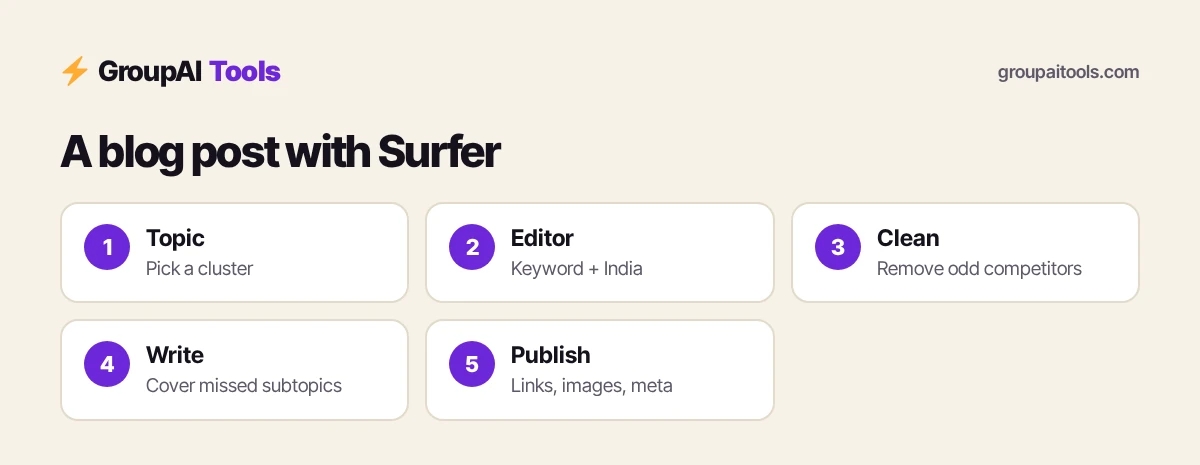
- Pick a keyword cluster from the Topical Map.
- Create a Content Editor document for the main keyword, India as location.
- Clean up the competitor list.
- Write an outline using suggested headings and your own expertise.
- Draft, then work through the terms list for missed subtopics.
- Bring the Content Score into the competitor range.
- Add internal links, images and a clear meta description, then publish.
How to use Surfer SEO for agencies
- Create a brand workspace per client (Pro allows 5).
- Use custom voices and templates for each client’s style.
- Share external collaboration links with writers and editors.
- Run quarterly content audits and report score and ranking changes.
Keep client login details and confidential strategy documents out of shared accounts.
How to use Surfer SEO for Indian niches
For finance, education, travel and local services, set the location to India so suggestions reflect Indian results: rupee pricing, Indian regulations, city names and local terms. For YMYL topics such as loans, insurance and health, back claims with official sources such as RBI, IRDAI or government sites, because coverage alone will not earn trust.
Surfer SEO with Semrush or Ahrefs
Surfer focuses on writing and on-page optimisation; Semrush and Ahrefs are broader suites for backlinks, technical audits and competitor research. Many teams use both: find opportunities in a suite, then write in Surfer. See our guides on how to use Semrush and how to use Ahrefs, and our shared Semrush (₹199/month).
Tips: how to use Surfer SEO faster
- Always set the right country before creating a document.
- Remove irrelevant competitors from every analysis.
- Write the outline yourself; use Surfy for drafts and rewrites.
- Do not chase a perfect Content Score.
- Refresh old winners before writing new content.
Common mistakes
- Stuffing every suggested term regardless of meaning.
- Leaving forums and marketplaces in the competitor list.
- Publishing AI drafts without expert review.
- Ignoring internal links and search intent.
- Never auditing content after publishing.
Surfer SEO on GroupAI Tools
| Factor | Surfer plan | Shared Surfer on GroupAI Tools |
|---|---|---|
| Price | $49–$299 a month billed yearly, plus tax and forex | ₹299/month |
| Payment | International card | UPI, RuPay, cards, net banking |
| Commitment | Yearly or monthly | Monthly, stop anytime |
| Workspaces and documents | Private to your team | Shared account; keep client strategy documents out |
| Support | Surfer support (24h, Mon–Fri) | WhatsApp 9:00 AM–11:30 PM IST, 48-hour refund guarantee |
Our plan gives you the Content Editor month by month in rupees by UPI, with no international card or forex charges. Read is group buy safe? for how sessions work.
How we checked
We read surferseo.com/pricing on 25 Oct 2026 for plans, prices, limits and features. Surfer renames and moves features as it updates; check its knowledge base or Surfer Academy if something looks different.
Get started on GroupAI Tools
Here is how buying works on GroupAI Tools. You pick Surfer SEO or another tool on its page, pay in rupees with UPI (GPay, PhonePe, Paytm, BHIM), RuPay, cards or net banking, and the tool appears in your dashboard. You open it from Dashboard Login at app.groupaitools.org in a private, isolated browser session, so you never type or see a shared password.
Software that is sold as a licence rather than a web app is delivered as a licence key or an activation by email or WhatsApp instead. WhatsApp support runs from 9:00 AM to 11:30 PM IST, and every tool page shows the 48-hour refund guarantee.
Browse more SEO tools on our SEO tools hub.
FAQs
How do I use Surfer SEO for the first time?
Create a Content Editor document for your keyword and country, clean the competitor list, then write while following the suggested terms, headings and length.
What is a good Content Score in Surfer?
A score in the range of your top competitors; chasing 100 is unnecessary.
Does Surfer SEO work for India?
Yes. Set the location to India so guidelines reflect Indian search results.
How much does Surfer SEO cost?
Discovery is $49, Standard $99, Pro $182 and Peace of Mind $299 a month billed yearly; monthly billing costs more.
Does Surfer have AI writing?
Yes. Surfy, the AI writing assistant, plus 1-click optimisation on Standard and above.
Can Surfer connect to Google Docs and WordPress?
Surfer lists WordPress and Google Docs among its integrations, from Standard upwards.
What is AI visibility tracking in Surfer?
Tracking whether AI models such as ChatGPT and Google AI Overviews mention your brand for chosen prompts.
What does shared Surfer SEO cost?
₹299/month on GroupAI Tools, paid monthly.