 GroupAITools
How to use Suno in 2026: make AI songs step by step, from prompt to finished track

Suno turns a text prompt or your own lyrics into a complete song with vocals and instruments in about a minute. It is popular with YouTubers who need background music, reel creators, indie musicians sketching ideas and anyone who wants a birthday song in Hindi or Punjabi. Getting a good result takes more than typing “make a song”, though. This guide shows how to use Suno step by step: writing prompts and lyrics, choosing styles, extending and remixing tracks, using your own voice, stems and Suno Studio, plus plans in rupees and what you can do with the songs. Our shared Suno Pro is ₹299/month.
We sell shared Suno access, so read this as vendor content. Plan details are from suno.com/pricing, viewed from India on 25 Oct 2026. See also our Suno price in India guide.
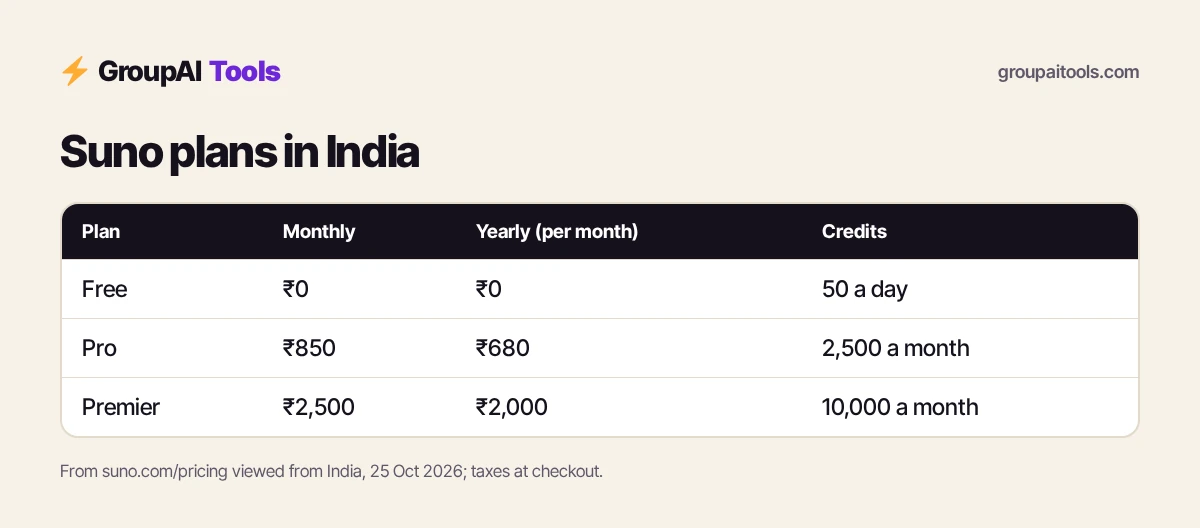
Short answer: to use Suno, open Create, describe the song (genre, mood, instruments, language and topic) or paste your own lyrics in custom mode, add a style, and generate. Pick the better of the results, then extend, remix or edit sections until it fits. Free gives 50 credits a day on the free model without commercial rights; Pro (₹850 a month, or ₹680 a month billed yearly) adds the best models, 2,500 credits a month, 20 downloads and commercial use; Premier (₹2,500, or ₹2,000 yearly) adds Suno Studio and 10,000 credits. Shared Suno Pro on GroupAI Tools is ₹299/month.
Suno plans in India
| Plan | Monthly | Billed yearly (per month) | Credits | Key features |
|---|---|---|---|---|
| Free | ₹0 | ₹0 | 50 a day | Free model (v6-mini), standard features, upload up to 8 min of audio, shared queue, no commercial rights |
| Pro | ₹850 | ₹680 | 2,500 a month | Best models (v6, v6-wild), 20 song downloads a month, commercial use rights, 2 stem types, priority queue up to 10 songs, your own voice, custom models |
| Premier | ₹2,500 | ₹2,000 | 10,000 a month | Suno Studio with MIDI, effects and automation, 60 downloads a month, 3 stem types, upload up to 30 min, add vocals or instrumentals |
| Shared Suno Pro on GroupAI Tools | ₹299/month | — | Shared | Monthly, UPI |
Taxes are calculated at checkout. Subscription credits do not carry over from day to day or month to month; purchased top-up credits do not expire but need an active subscription. Yearly billing saves ₹2,040 a year on Pro and ₹6,000 on Premier.
How to use Suno, step 1: write your first prompt
Open Create and start in the simple mode. Describe the song in one or two sentences, covering:
- Genre: lo-fi hip hop, Bollywood romantic, Punjabi bhangra, acoustic folk, EDM.
- Mood: uplifting, nostalgic, energetic, calm.
- Instruments: sitar and tabla, piano, 808 bass, acoustic guitar.
- Vocals and language: female Hindi vocals, male English rap, instrumental only.
- Topic: monsoon in Mumbai, a friend’s birthday, a product launch.
Example: “Upbeat Bollywood pop song with female Hindi vocals, dhol and synths, about the first monsoon rain in Mumbai.” Suno returns two versions; listen to both before changing anything.

Step 2: Use custom mode for your own lyrics
Switch to custom mode when you want control. Paste lyrics and mark sections with tags such as [Verse], [Chorus], [Bridge] and [Outro]. Add a style description separately, such as “soulful R&B, slow tempo, female vocals”. Keep lines short and rhythmic; very long lines are harder to sing naturally.
Suno can also co-write: give it a theme and let it draft lyrics, then edit them in your own words. Original lyrics usually produce more distinctive songs than generic prompts.
Step 3: Choose the model and style
Free accounts use the free model (v6-mini). Pro and Premier unlock Suno’s advanced models, v6 and v6-wild, which generally give richer vocals and arrangements. Use specific style tags rather than artist names; describe the sound you want instead of copying a real singer.
Step 4: Extend, remix and edit
- Extend a track to add another verse or a longer outro.
- Cover or remix to try a new style on the same song, or adjust speed.
- Basic editing lets you crop and fade; Pro and Premier add advanced editing to replace or add a section.
- Use Inspire and Magic Song Descriptions for new ideas when you are stuck.
A good habit when learning how to use Suno: generate several versions, keep the best one, then refine it with extend and edit rather than starting from scratch.
Step 5: Use your own voice and audio
You can upload audio as a starting point: up to 8 minutes on Free and up to 30 minutes on Premier. Pro and Premier let you record, upload and create with your own voice and build custom models. Premier can add new vocals or instrumentals to existing songs. Only upload recordings you own or have permission to use.
Step 6: Extract stems and finish in Studio
Stems separate vocals, drums and other parts so you can mix them in an editor. Pro includes two stem types (auto and split from mix); Premier adds advanced split. Premier also includes Suno Studio, with MIDI, effects, automation and design-your-own plugins, for producers who want to finish tracks inside Suno.
Step 7: Download and use your songs
Free does not include monthly song downloads or commercial rights. Pro includes 20 downloads a month and Premier 60, both with commercial use rights. Read Suno’s terms of service for limits on commercial use before releasing music on streaming platforms or using it in client work.
How to use Suno for YouTube and reels
- Describe the mood of your video and ask for an instrumental track.
- Generate a few versions and pick one that does not compete with your voiceover.
- Extend it to match the video length.
- Download on a paid plan with commercial rights for monetised videos.
- Keep a note of the song title and plan used, in case of copyright claims.
If you also need an avatar presenter, see how to use HeyGen, and our vidIQ price in India guide for growing the channel.
How to use Suno for songs in Indian languages
Write lyrics in Hindi, Tamil, Punjabi or other languages in custom mode, using the script you want sung, and state the language in the style field. Test short lyrics first: pronunciation can vary, and small spelling changes often fix awkward words. Mixing English and Hindi works well for modern pop. Knowing how to use Suno with Indian languages opens up wedding songs, festival reels and regional ads.
How to use Suno credits wisely
Each generation uses credits from your daily (Free) or monthly (paid) allowance. Unused subscription credits do not roll over, so heavy users should pace generations through the month. Pro and Premier users can buy top-up credits, which do not expire while the subscription is active.
Tips for better Suno songs
These habits make the biggest difference once you know how to use Suno.
- Be specific about genre, tempo and instruments.
- Use section tags in lyrics so the structure is clear.
- Keep choruses short and repeatable.
- Generate in batches and keep the best take.
- Avoid naming real artists; describe the sound instead.
Common mistakes
- Using Free-plan songs in monetised videos without commercial rights.
- Uploading someone else’s vocals or copyrighted tracks.
- Writing very long lyric lines that the vocals rush through.
- Expecting a perfect song in one try.
- Assuming credits roll over at the end of the month.
Rights and privacy on shared plans
Under Suno’s terms, commercial rights depend on the plan a song was made on. If you plan to release music commercially or need clear ownership records, use your own Pro or Premier account. Shared access suits learning how to use Suno, drafting ideas and personal projects. Songs on a shared account are visible to other users, and do not upload private recordings of your voice there.
Official vs shared Suno on GroupAI Tools
| Factor | Official Suno | Shared Suno on GroupAI Tools |
|---|---|---|
| Monthly cost | ₹850 monthly, or ₹680 a month yearly (Pro) | ₹299/month |
| Payment | Card at checkout, often international | UPI, RuPay, cards, net banking |
| Commitment | Monthly or yearly plan | Monthly, stop anytime |
| Account | Private to you | Shared account opened in a private session; keep commercial releases in your own account |
| Support | Suno help centre | WhatsApp 9:00 AM–11:30 PM IST, 48-hour refund guarantee |
How we checked
We opened suno.com/pricing from an Indian connection on 25 Oct 2026 and recorded the prices and plan features shown there. Dollar prices are converted at ₹94.9 per dollar, before GST and forex fees. Vendors change plans and prices often, so check the official page before buying.
Get started on GroupAI Tools
Here is how buying works on GroupAI Tools. You pick Suno Pro or another tool on its page, pay in rupees with UPI (GPay, PhonePe, Paytm, BHIM), RuPay, cards or net banking, and the tool appears in your dashboard. You open it from Dashboard Login at app.groupaitools.org in a private, isolated browser session, so you never type or see a shared password.
Software that is sold as a licence rather than a web app is delivered as a licence key or an activation by email or WhatsApp instead. WhatsApp support runs from 9:00 AM to 11:30 PM IST, and every tool page shows the 48-hour refund guarantee.
Browse more tools on our video and audio tools hub, and read is group buy safe? before you pay any seller. For voiceovers, see how to use ElevenLabs.
FAQs
How do I use Suno for free?
Sign up and use Create with 50 free credits a day on the free model. Free songs do not include commercial rights.
How much does Suno cost in India?
Pro is ₹850 a month or ₹680 a month billed yearly; Premier is ₹2,500 or ₹2,000 yearly, plus taxes at checkout.
Can I use Suno songs on YouTube?
Pro and Premier include commercial use rights; read Suno’s terms for limits. Free songs do not include commercial rights.
Can Suno sing in Hindi?
Yes. Write lyrics in Hindi in custom mode and mention the language in the style.
Can I use my own voice in Suno?
Pro and Premier let you record, upload and create with your own voice.
What is Suno Studio?
A production workspace on Premier with MIDI, effects, automation and plugins.
Do Suno credits roll over?
No. Subscription credits do not carry over; purchased top-ups do not expire while you are subscribed.